SplitRig: dual camera app for iPhone SplitRig

Language

Comparison

SplitRig vs Filmic Pro

Both cameras in one free app, up to 4K on the rear of supported iPhones, or deep manual control of one camera on a subscription.

In short

SplitRig records your front and back cameras together in one video, free with every feature unlocked and no subscription: the rear camera in up to 4K (40 Mbps at 30 fps) on supported iPhones, 60 fps in Action Cam, and stabilization you choose while both cameras record. Filmic Pro is built for manual-control capture from one camera, with weekly and yearly subscription plans; its maker's separate dual-camera app is DoubleTake.

Download on the App Store

Free · no subscription · no ads

The top 5 SplitRig vs Filmic Pro

  • Layouts

    4 layouts

    One camera at a time

  • Saved file

    One synced file

    One camera per recording

  • Price

    Free no ads, no subscription

    From $1.99 a week

  • Live overlays

    7 live metrics

    Not stated

  • Teleprompter

    Built in

    Not stated

Show all 13 features
  • Best resolution4K at 30 fpsNot stated
  • Highest frame rate60 fps in Action Cam240 fpshardware specific
  • LensesEvery lensZoom; lenses not stated
  • StabilizationOff, Standard, StableStandard, cinematic
  • AudioUSB-C and Lightning mics16 or 24-bitmanual gain
  • Hands-free control4 ways Watch, AirPods, Camera Control, volume buttonsWatch, second device
  • Crash-safe savingSaved as it recordsNot stated
  • Time limitNoneNot stated
  • Focus and exposureTap, slider, lockManual sliders
  • WatermarkRemovable free, one tapNot stated
  • AdsNoneNot stated
  • Account and privacyNo accountNot stated
  • DevicesiPhone 11 and lateriOS 14.1 or later

Where SplitRig pulls ahead

  • Both cameras in one app. SplitRig records the front and back cameras at the same time into one video, ready to post, with the rear camera in up to 4K (40 Mbps at 30 fps) on supported iPhones and 60 fps in Action Cam.
  • Free with every feature unlocked: no subscription, no in-app purchases, no ads and no account.
  • Four layouts you can switch mid-recording: Picture in Picture, Split Screen (adjustable from 30/70 to 70/30), Face Mode (your face over the rear shot, background removed, no green screen) and Single Camera.
  • Eight overlay widgets written into the video: seven live metrics (speed, distance, altitude, pace, goal gauge, sound level, duration) plus the SplitRig logo. Plus a teleprompter that scrolls over the preview and never appears in the saved video.
  • Hands-free control from the SplitRig app for Apple Watch, your AirPods stem (iOS 26, AirPods with H2), the Camera Control button (iPhone 16 and later) and the volume buttons, on iPhone 11 and later.
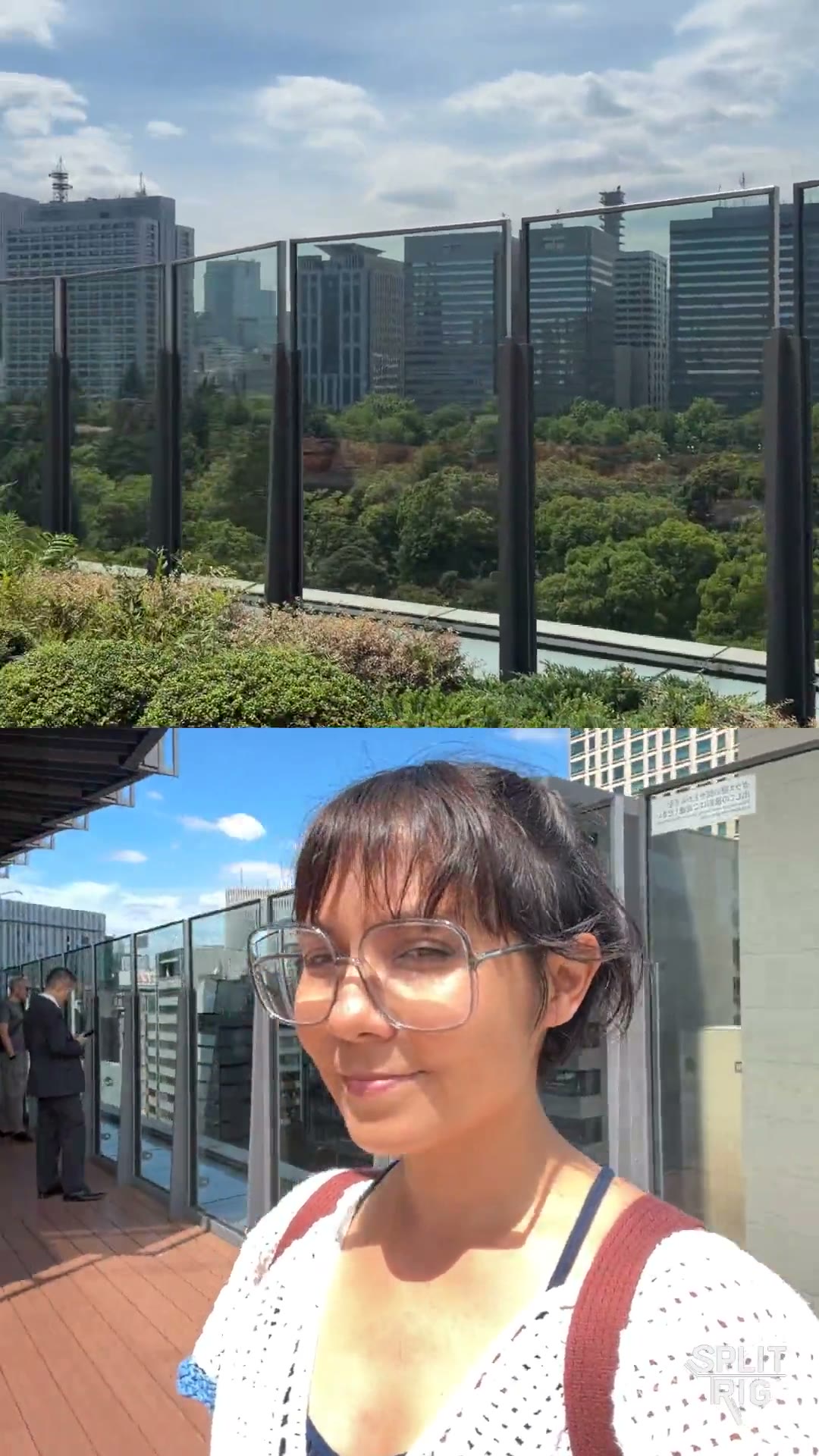
Split Screen: the Tokyo skyline over a rooftop selfie, shot on SplitRig
0:07

Shot on SplitRig. Split Screen.

The Tokyo skyline above, a rooftop selfie below.

What Filmic Pro is built for

Every app has its focus. Here is what Filmic Pro is designed around, so you can pick the right tool for each shot.

  • Built for deep manual control: ProRes capture from Proxy to 4444, log gamma curves, Dolby Vision HDR, and live zebras, false color and focus peaking.
  • High-speed frame rates of 60, 120 and 240 fps, slow and fast motion, and time lapse.
  • Pro workflow extras: clean HDMI out, Frame.io Camera to Cloud, gimbal support, and Filmic Remote for control from a second iOS device.

Dual camera apps compared, spec by spec

  • SplitRig

    Max resolution
    4K at 30 fps, 40 Mbps, rear camera on supported iPhonesthe Picture in Picture or Split Screen file is 4K; the front keeps its own resolution
    Frame rates
    24 or 30 fps; 60 fps at 1080p in Action Cam24 fps is the cinematic, coolest-running choice
    Saved file
    One synced file, straight to Photos as recorded (.mov)no export step, no re-compression
    Layouts
    Picture in Picture, Split Screen, Face Mode, Single CameraPicture in Picture as a Rectangle or a Circle; Face Mode: live background removal, any photo as backdrop; Split Screen 30 to 70%
    Lenses
    Every lens and zoom level, 0.5x ultra wide to telephotoon iPhones that have those lenses; Action Cam supports 0.5x
    Stabilization
    Off, Standard or Stable on the rear, chosen per modeAction Cam uses the iPhone's top tier; a 16:9 front is always stabilized
    Teleprompter
    Built in; script visible only to you, never in the video
    Audio
    USB-C and Lightning mics, wireless kits via receiver, 48 kHzhot-swap mid-recording; music keeps playing
    Hands-free control
    Apple Watch app, AirPods shutter, Camera Control, volume buttonsAirPods Pro 2, AirPods 4 or AirPods Pro 3 on iOS 26; Camera Control on iPhones with it
    Live overlays
    Seven live metrics burned in: GPS speedometer, pace, distance, altitude and morealso duration, sound level and goal gauge, plus the SplitRig logo
    Long-shoot performance
    Smart recording engine, tuned with Apple's native camera featuresfor pro-grade performance, with no time limit
    Crash-safe saving
    Written as it records; interrupted takes return on a recovery card2 s fragments: a take is kept up to its last couple of seconds
    Time limit
    No time limit, at any resolution
    Focus and exposure
    Tap to focus, exposure slider, hold to lock focus and exposure
    Watermark
    SplitRig logo, removable free in one tap
    Price
    Free; no subscription, no in-app purchases, every feature works from first launch
    Ads
    No ads
    Account and privacy
    No account; no tracking, everything stays on the iPhone
    Devices
    iPhone 11 and later, iOS 26 or later
  • Filmic Pro

    Max resolution
    Not stated
    Frame rates
    24 to 60 fps; 120 or 240 fps high speed, hardware specific
    Saved file
    One camera per recording
    Layouts
    One camera at a timefront and back together is not listed; its seller publishes a separate multi-cam app, DoubleTake
    Lenses
    Zoom control; lens choice not stated
    Stabilization
    Standard or cinematic, hardware specific
    Teleprompter
    Not stated
    Audio
    Manual input gain, 16 or 24-bit, uncompressed PCM; external mics not stated
    Hands-free control
    Apple Watch start, stop and preview; Filmic Remote from a second iOS device
    Live overlays
    Not stated
    Long-shoot performance
    Not stated
    Crash-safe saving
    Not stated
    Time limit
    Not stated
    Focus and exposure
    Three focus and exposure modes, manual sliders, rack-focus pull points
    Watermark
    Not stated
    Price
    Subscription: $1.99 to $9.99 / week, $39.99 / yearfree download; plus a $13.99 Cinematographer Kit
    Ads
    Not statedno 'Contains Advertising' label on the US listing
    Account and privacy
    Not stated
    Devices
    iOS 14.1 or later

Other apps: details checked 2026-10-19.

Common questions

Does Filmic Pro do dual camera recording?
Filmic Pro's App Store listing does not list recording the front and back cameras at the same time (checked September 23, 2026). Its App Store seller, Bending Spoons, publishes a separate dual-camera app, DoubleTake. SplitRig records both cameras at once in one app, free, on iPhone 11 and later.
Do I need a subscription to record both cameras with SplitRig?
No. SplitRig is free with every feature unlocked, including 4K on supported iPhones: no subscription, no in-app purchases, no ads and no account. Filmic Pro is free to download, with weekly and yearly subscription plans on its US App Store listing.
Can SplitRig switch layouts during a recording?
Yes. Picture in Picture, Split Screen, Face Mode and Single Camera switch mid-recording without stopping, from the screen or from the SplitRig app on Apple Watch. Face Mode places you over the rear shot with the background removed, no green screen needed.
Can I use SplitRig and Filmic Pro together?
Yes. Filmic Pro is built for deep manual control, with ProRes, log gamma and high frame rates; SplitRig is built for recording both cameras at once into one video you can post as it is, with the rear camera in up to 4K on supported iPhones. Keep both on your iPhone and open whichever fits the shot. SplitRig is an independent app and is not affiliated with Bending Spoons.

Pick SplitRig if

You want yourself and the scene in the same video, free: reactions, vlogs, tutorials, rides with a live speedometer. Pick a layout, switch it mid-recording, and post the file as it is.

Pick Filmic Pro if

You want deep manual control of your iPhone camera, with ProRes, log gamma and high frame rates, and a subscription plan fits your workflow.